Table of Contents
Kinect and other rgbd-cameras
All the rgb-d cameras we have in the lab
Kinect v1 : Kinect 360
Libraries to use the kinect :
- to retrieve the informations from the kinect via ros opennilaunch
- detection of people via ros opennitracker
- return the position of the first user torso detected by the kinect opennitrackermodified
Kinect v2 : Kinect One
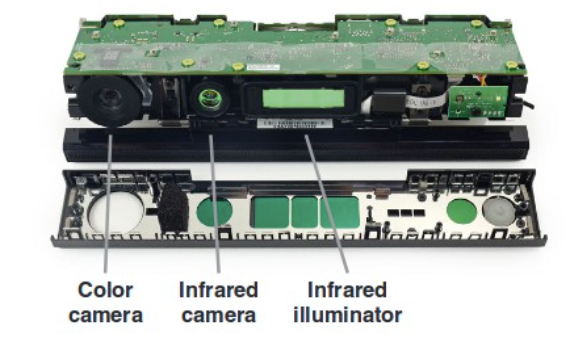
There is a current installation of Kinect for Windows SDK on the computer DELL.
References
- To install on a macos : https://github.com/OpenKinect/libfreenect2
- Librairie Python pyfreenect2 pour utiliser les données libfreenect2 en python : https://github.com/tikiking1/pyfreenect2
- Librairie Python PyKinect pour utiliser les données Skeleton issues de la Kinect : https://pytools.codeplex.com/wikipage?title=PyKinect
- MichaelBloesch,PéterF ankhauser,MarcoHutter,RalfKaestner,DiegoRodriguez,RolandSiegwart. (2015). Kinect v2 for Mobile Robot Navigation: Evaluation and Modeling
- iFixit, “Xbox One Kinect Teardown,” https://www.ifixit.com/Teardown/ Xbox+One+Kinect+Teardown/19725, (Janvier 2015)
- Zennaro,S.(2014) EvaluationofMicrosoftKinect360andMicrosoftKinectOneforroboticsand computer vision applications. Università degli Studi di Padova. Thesis.
- Wiedemeyer, T. (2015) IAI Kinect2: Tools for using the Kinect One (Kinect v2) in ROS , https://github.com/code-iai/iaikinect2
- El-laithy, R.A., Huang, J., Yeh, M. (2012) Study on the Use of Microsoft Kinect for Robotics Applications. Proceedings of IEEE/ION PLANS 2012 , Myrtle Beach, South Carolina , April 2012, pp. 1280- 1288.
- Rosado, J.; Silva, F.; Santos, V. & Lu, Z. (2013), R eproduction of human arm movements using Kinect-based motion capture data., in 'ROBIO' , IEEE, , pp. 885-890 .
- Albrektsen, S. M. (2011) Using the Kinect Sensor for Social Robotics. NTNU – Trondheim. Thesis
Install on Linux
These instructions have not been successfully tested yet
Bon, vous avez besoin d'abord d'un contrôlleur USB 3.0 sinon la Kinect est même pas détectée ! Ensuite vérifier que vous avez un noyau linux >3.16 minimum car les versions les plus anciennes ont un bug.
Ensuite pour continuer, vous utilisez libfreenect2 ? Si c'est le cas, après l'installation de la bibliothèque vous devez utiliser l'accélération matérielle pour pouvoir décoder les frames et vous avez 2 choix 1. Vous avez une carte NVidia avec le pilote propriétaire installé et vous l'utilisez pour l'accélération 2. Vous avez un processeur Intel 4ème ou 5ème génération et vous utilisez OpenCL pour le décodage.
Concernant OpenCL, vous installez beignet dernière version depuis les sources et vous le compilez (le paquetage ubuntu n'est pas mis à jour depuis longtemps)
Ensuite, dernière étape, si vous avez réussi à lancer l'exemple principal et que vous avez les fenêtres noirs, vous mettez cette ligne et vous relancer # echo 0 > /sys/module/i915/parameters/enable_cmd_parser
Kinect Skeletal tracking
- Joints

- Joint hierarchy

- Hierarchical bone orientation: The orientation information is provided in form of quaternions and rotation matrices for use in different animation scenarios.
Bone rotation is stored in a bone’s child joint. For example, the rotation of the left hip bone is stored in the Hip Left joint. In the hierarchical definition, the rotation of the Hip Center joint provides the absolute orientation of the player in camera space coordinates. This assumes that the player object space has the origin at the Hip Center joint, the y-axis is upright, the x-axis is to the left, and the z-axis faces the camera.
- Reference to skeletal tracking and joint orientation:
x-tion
Comparison
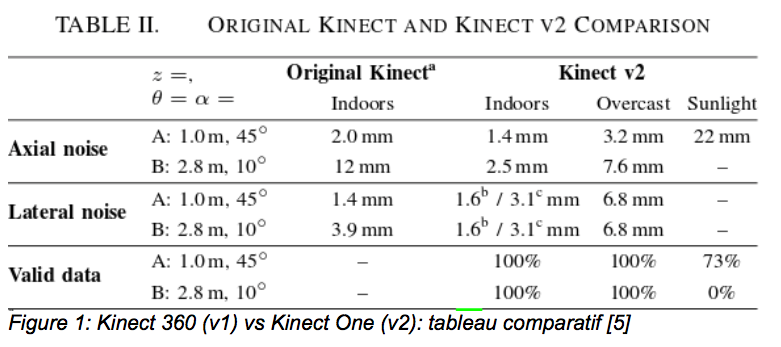
SR300
This paragraph explains how to install the legacy SR300 on recent Linux systems.
- Support for the retired SR300 camera model ended after librealsense 2.50.0. So you should compile version 2.50.0 in order for the SR300 to be detected. (https://github.com/IntelRealSense/librealsense/releases/tag/v2.50.0)
- Librealsense comes with two backend:
- The “native” backend is a Linux kernel driver. It is therefore very dependent on the kernel to run (the latest one (I wrote this in Sept. 2025) is for Linux 6.8.0, the one for legacy Realsense devices is for Linux 4.4)
- The “libuvc” backend uses the standard uvc+hid kernel drivers and does the job in userland via the standard libuvc library. It is possibly less efficient (latency), but it is much more flexible and mostly independent of Linux kernel version.
So, the idea is to compile librealsense v2.50.0 with the libuvc backend. The following is freely adapted from libuvc_installation.sh (https://github.com/IntelRealSense/librealsense/blob/master/scripts/libuvc_installation.sh#L35-L39)
- Compile & Install
    wget https://github.com/IntelRealSense/librealsense/archive/refs/tags/v2.50.0.tar.gz
    tar xvf v2.50.0.tar.gz
    cd ./librealsense-2.50.0

    sudo cp config/99-realsense-libusb.rules /etc/udev/rules.d/
    sudo udevadm control --reload-rules && sudo udevadm trigger

    sudo apt-get install -y git cmake libssl-dev freeglut3-dev libusb-1.0-0-dev pkg-config libgtk-3-dev
    mkdir build && cd build
    cmake ../ -DFORCE_LIBUVC=true -DCMAKE_BUILD_TYPE=release
    make -j2
    sudo make install
- Test
    rs-enumerate-devices
    realsense-viewer
- Tips: In case compilation fails on some non-essential SDK functionnalities, try to add one or several of the following compilation options on the cmake command line: `-DCHECK_FOR_UPDATES=OFF` `-DBUILD_EXAMPLES=OFF` `-DBUILD_TOOLS=OFF`